
Rules on Device
Rules on Device are rules that run on the device, so they keep working when the network is down. You build them on an Input → Logic → Output canvas and then send them to the device. Available for supported models (Sentinel, firmware 0.7.0 and later).
Concepts
Section titled “Concepts”The canvas is only a way to edit. The device never receives the graph: the server compiles the graph into a rules array that the firmware understands.
| Node | Purpose |
|---|---|
| Input | One source: t1 to t4 (temperature), temp_ambient, humidity, voltage, current, power_draw, d1 to d4 (digital inputs). Firmware 0.16.0 and later adds status sources (o1 to o4, alarm_level, f1 to f4), Formula, and Schedule: see Rules v2. |
| Logic | One rule: an AND/OR mode, for_s (how long the condition must hold), cooldown_s, and enabled/disabled. |
| Output | out (Digital output o1 to o4: ON, OFF, or following the condition, with a time limit), event (send an event), lcd (text on the display, with placeholders such as {t1}), or Flag (v2). |
An Input → Logic connection carries a clause (operator, value, hysteresis); a Logic → Output connection carries a phase (then, else, or both). With v2, a Logic → Logic connection makes one rule read the status of another.
Validation
Section titled “Validation”The firmware rules are mirrored on the server: at most 12 rules, 4 inputs per logic, 4 actions per phase, a message of at most 3500 bytes, one event and one LCD per phase, follow mode on only one rule per output, hysteresis only for >, >=, <, <=, and LCD text in ASCII up to 40 characters. The v2 limits are explained below. Errors block saving and sending (attached to the node or connection). Warnings (for example a source or output disabled in the configuration, a dangling node) do not block.
Rules v2: formulas, schedules, flags, and rule status
Section titled “Rules v2: formulas, schedules, flags, and rule status”Rules v2 adds what was missing before: calculations between sensors, schedules, latching, and rules that depend on other rules. Everything stays declarative: the device runs no scripts, and the server checks the whole graph before it is sent. It needs firmware 0.16.0 or later.
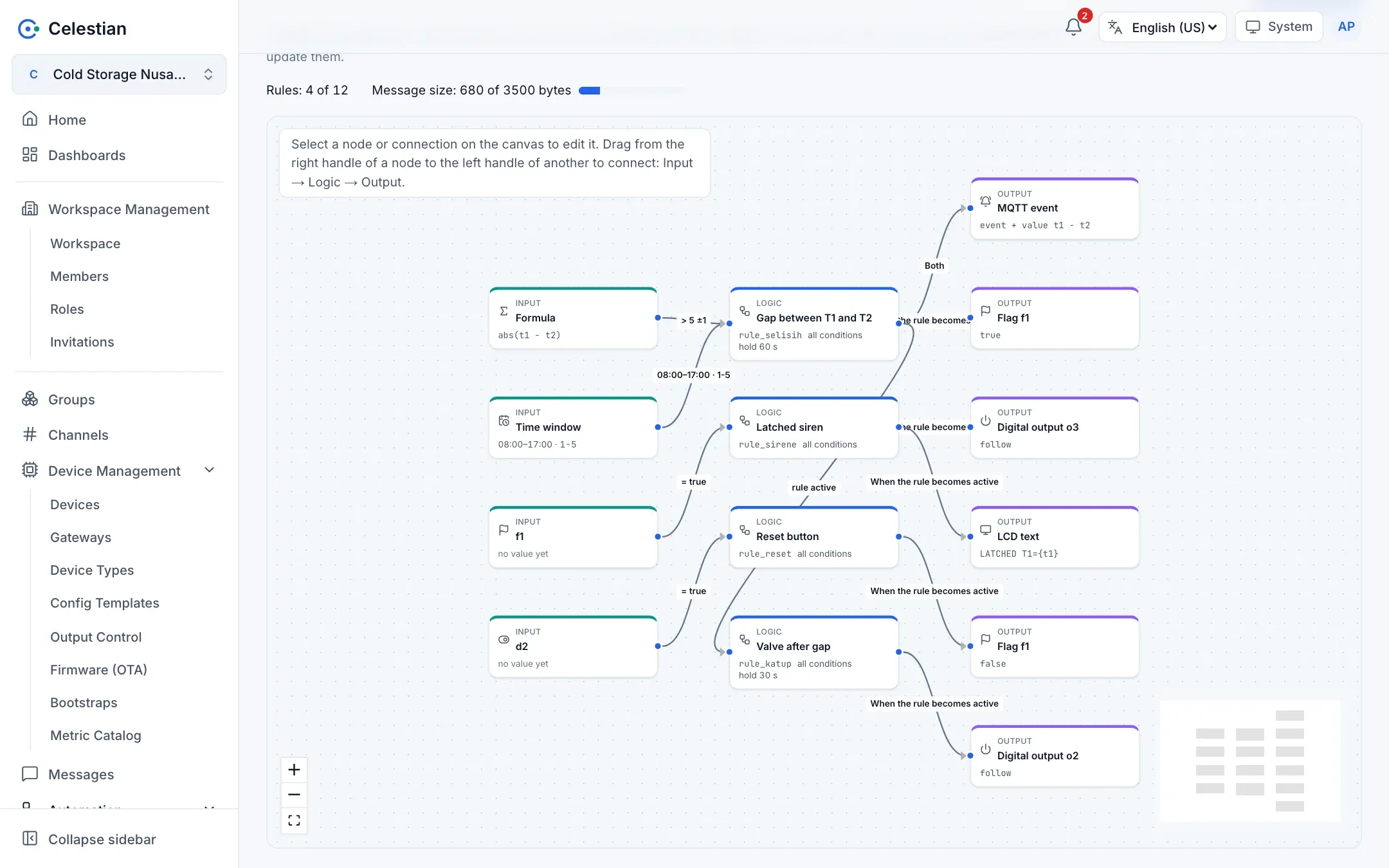
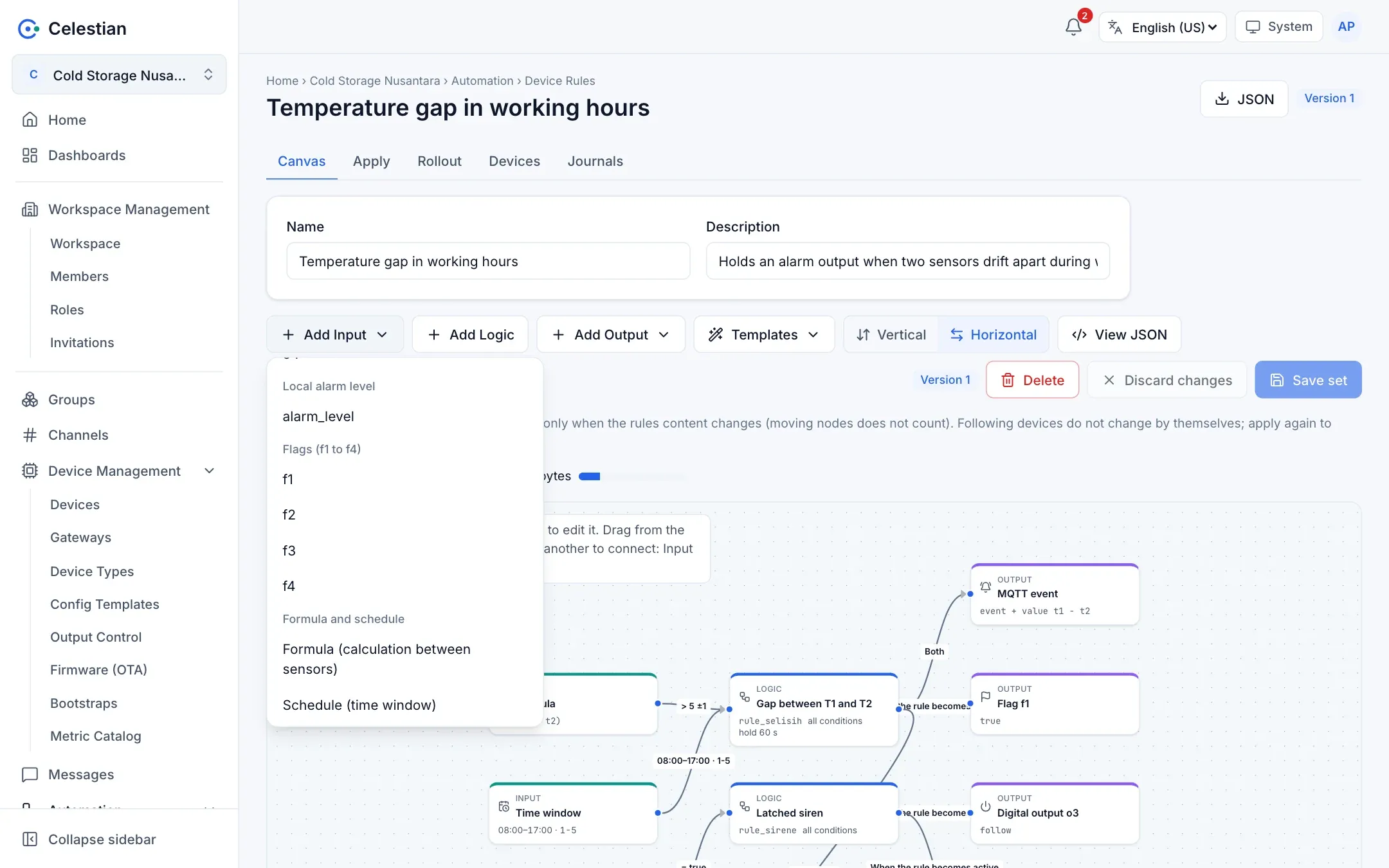
The Add Input menu has new groups:
Formula
Section titled “Formula”A Formula node calculates a number from several sources, then its clause compares the result with a fixed value, with hysteresis if needed. For example: abs(t1 - t2) with operator > and value 5.
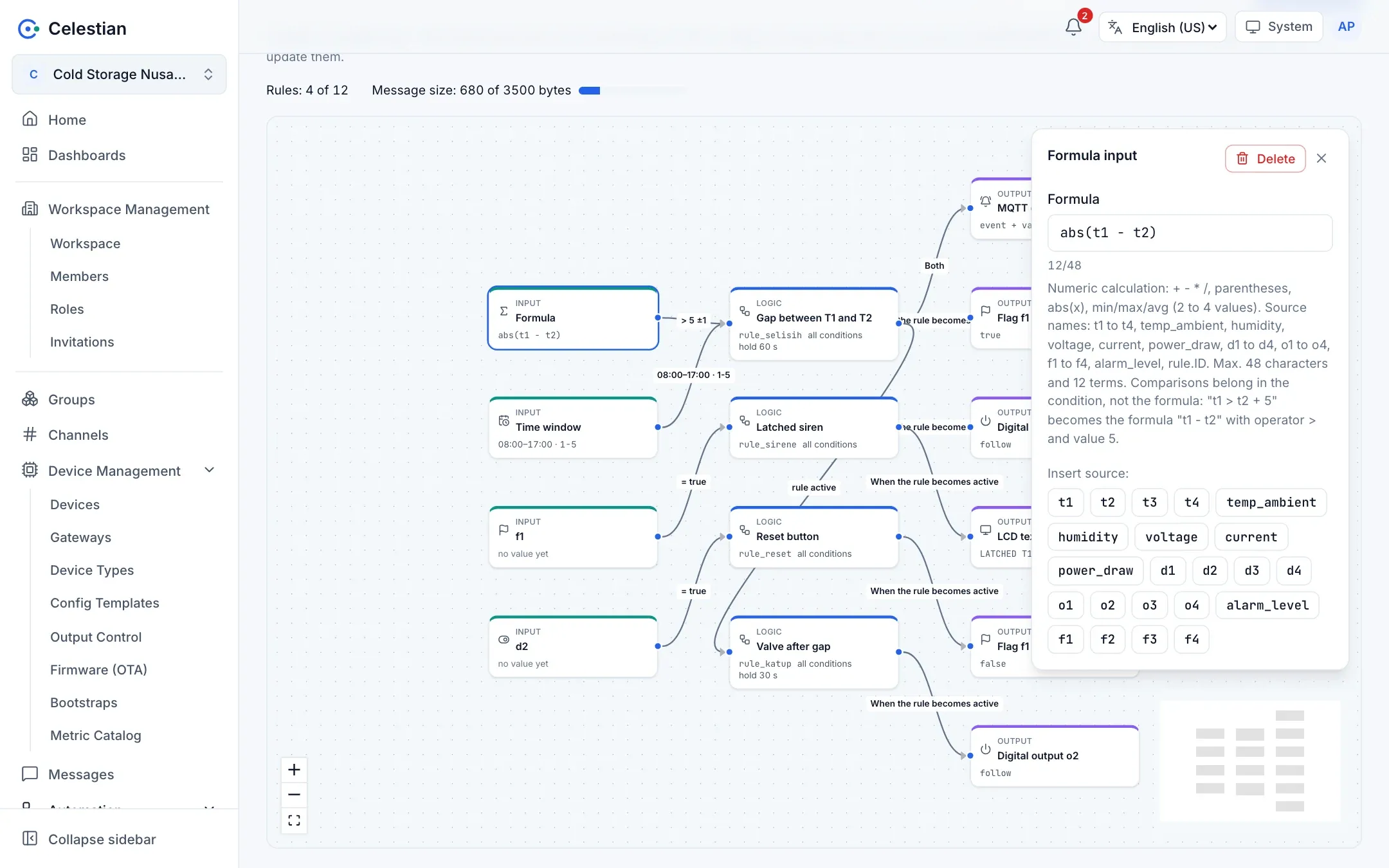
- Operators
+ - * /, parentheses, and the functionsabs(x),min,max,avg(2 to 4 values). - Allowed sources: every source in the table above, plus
rule.ID(the active status of another rule). Digital and status inputs are read as 0 or 1. - Limits: 48 characters, 12 terms (numbers, sources, operators, and functions are counted), and 4 levels of parentheses.
- No comparisons or logic inside a formula.
t1 > t2 + 5is written as the formulat1 - t2with operator>and value5. AND/OR logic stays in the Logic node. - When a source is missing, the formula result is empty and the clause keeps its previous result, as with a single source. Division by zero also gives empty.
min,max, andavgdo not skip a missing sensor: a failed sensor is not hidden. - An Event node may carry a value that is a formula (it fills the metric
rule_ID_value).
Schedule
Section titled “Schedule”A Schedule node states a time window in the device’s local time. Its clause is true while the device clock is inside the window; it has no operator or value.
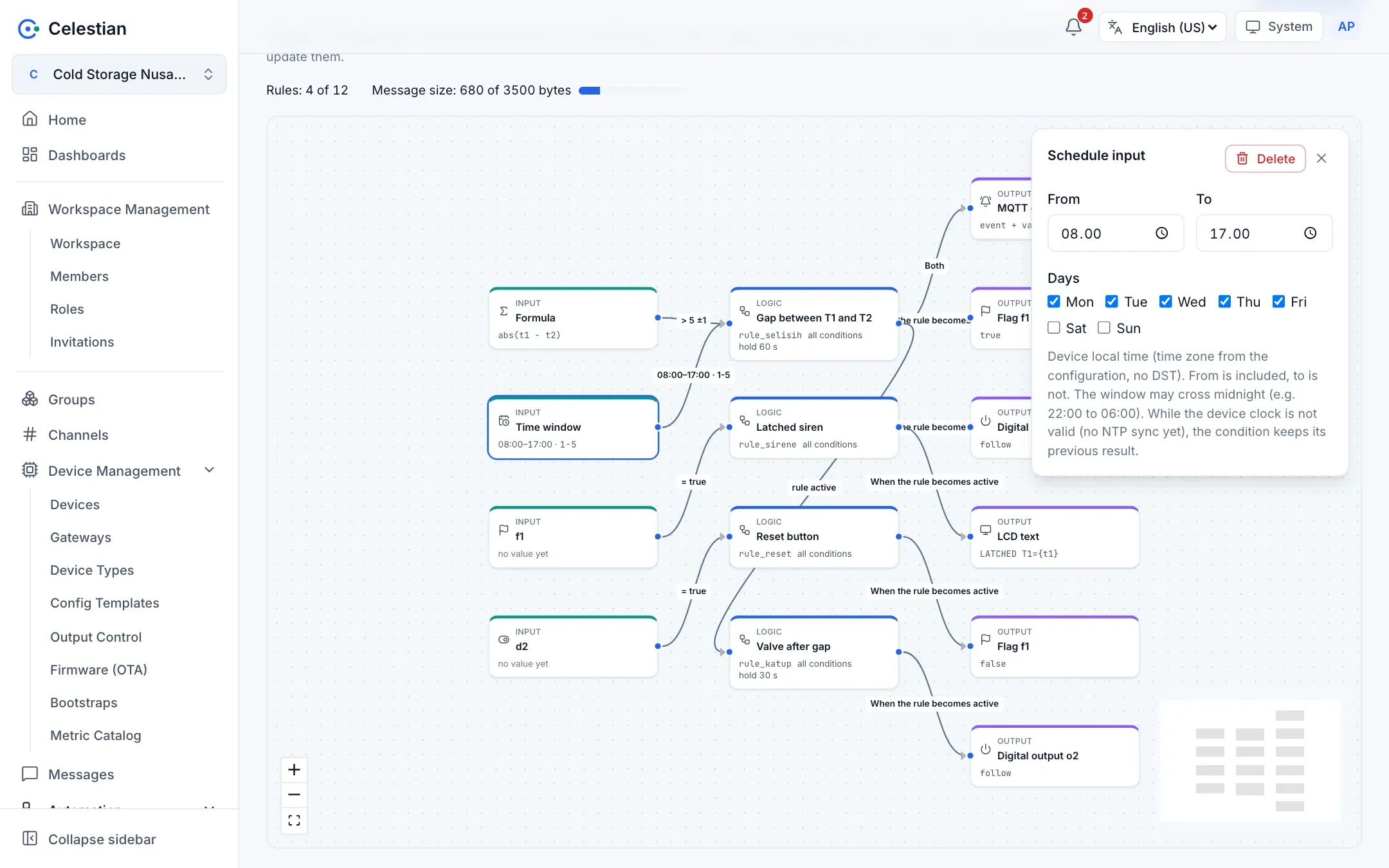
- From is included, to is not. The window may cross midnight (22:00 to 06:00); the days you select are the days on which the window starts.
- Days are chosen one by one (Monday to Sunday); all days means no day restriction.
- Time uses the time zone from the device settings (
tz_offset_min), without daylight saving. - While the device clock is not valid (no NTP sync yet, or too long without one), the clause keeps its previous result and a running
for_scount is cancelled. After a reboot without a network, scheduled rules stay inactive until the clock is valid. See MQTTS and NTP.
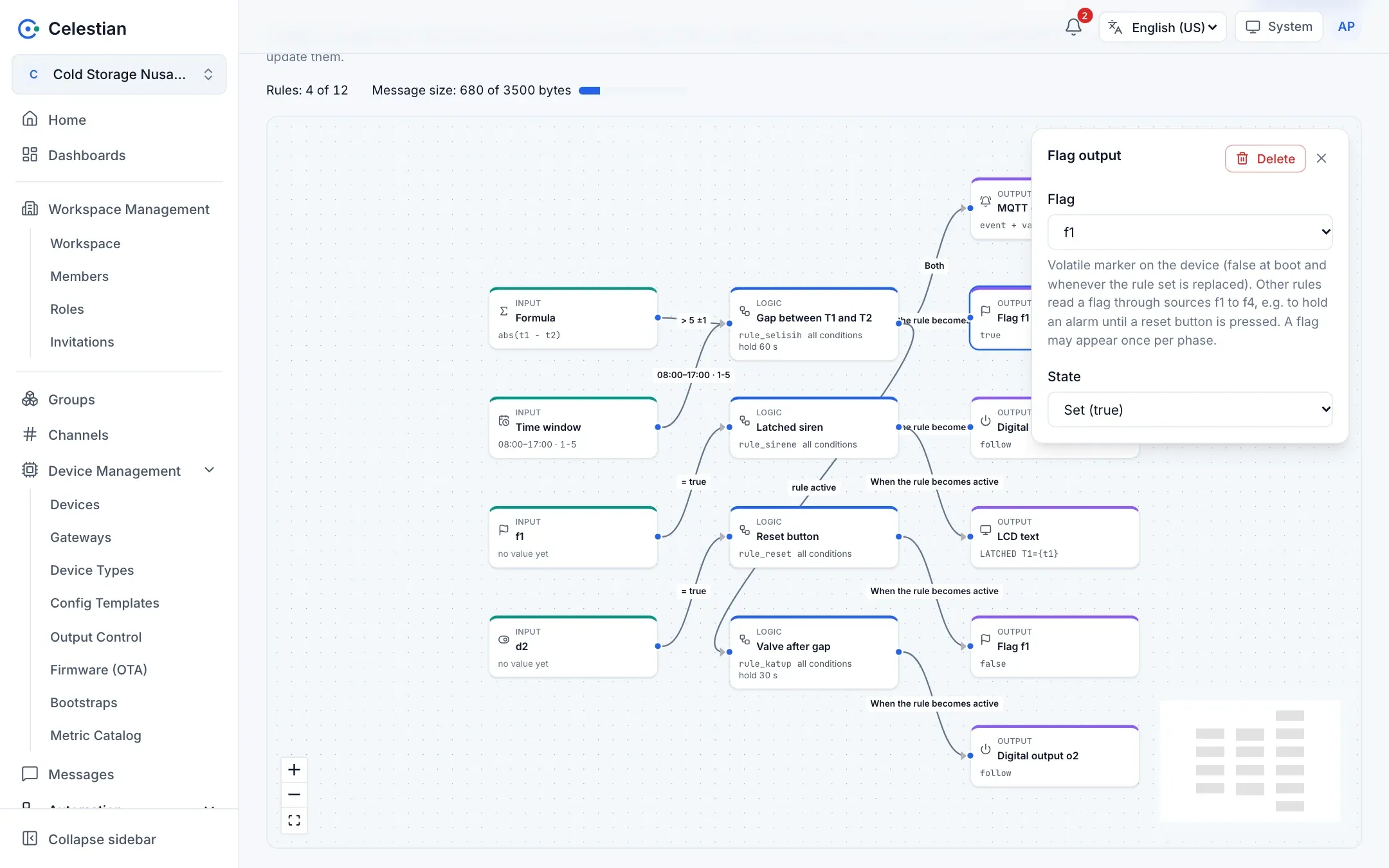
A flag (f1 to f4) is a marker on the device. A Flag output node writes true or false when the rule becomes active (or inactive), and other rules read the flag through the sources f1 to f4. Use it to latch a state, for example an alarm that stays on until a reset button is pressed.
- Flags are volatile:
falsewhen the device powers on and every time the rule set is replaced. - A flag may appear only once per phase within a rule. Several rules may write the same flag; the one evaluated last wins.
- The device reports the flags in use as the boolean metrics
flag_f1toflag_f4in telemetry. Theflag_prefix is reserved, so it cannot be used as a slot name. - A flag action runs when the rule changes state, before the rules that read it are evaluated, so readers see the new value in the same cycle.
Rule status and status sources
Section titled “Rule status and status sources”- A Logic → Logic connection: the target rule reads the active status of the source rule (after its
for_shold). In the connection panel you choose whether the condition is “rule active” or “rule inactive”. A rule may reference at most 4 different rules. o1too4: the real state of the outputs, including the effect of manual commands.alarm_level: the device’s local alarm level, 0 normal, 1 warning, 2 alarm.f1tof4: the flags.
With a Logic → Logic connection, a sequence such as “start the pump, open the valve 30 seconds later” needs no special feature: the second rule reads the status of the first with a for_s of 30.
v2 rules
Section titled “v2 rules”- No cycles. Rule A may not depend on itself, directly or through other rules, outputs (reading an
oNit writes), or flags. Every rule in a cycle is rejected, and the editor shows the path, for examplea -> b -> a. A Logic → Logic connection that would directly form a cycle cannot even be drawn. - References must exist. A rule that reads a rule that is not sent (no input, no output, or with a problem) is rejected as well.
- Evaluation order is automatic: what is read is evaluated first, so a chain reacts in the same cycle without delay.
- The other limits stay: 12 rules, 4 conditions per rule (a time window counts), 4 actions per phase (a flag action counts), and a 3500-byte message. Formulas and schedules add bytes per condition, so fewer rules may fit than with v1; the message size is shown above the canvas.
Examples
Section titled “Examples”Pump, then the valve 30 seconds later. The rule pompa becomes active when t1 reaches 60 (hysteresis 3) and turns on o1. The rule katup reads rule.pompa with a for_s of 30 and turns on o2.
{"rules_ver": 9, "rules": [ {"id": "pompa", "if": {"all": [{"src": "t1", "op": ">=", "v": 60, "hyst": 3}]}, "then": [{"do": "out", "o": "o1", "state": "follow"}, {"do": "event"}], "else": [{"do": "event"}]}, {"id": "katup", "if": {"all": [{"src": "rule.pompa", "op": "==", "v": true}]}, "for_s": 30, "then": [{"do": "out", "o": "o2", "state": "follow"}]}]}An alarm latched until a reset button. Three rules: tahan sets f1 when t1 reaches 80, reset clears f1 when input d2 is active, and sirene turns on o3 while f1 is true. A temperature that drops back does not switch the siren off; only the reset button does.
The gap between two sensors, only in working hours. One rule with a formula clause abs(t1 - t2) > 5 (hysteresis 1) and a schedule clause 08:00 to 17:00 Monday to Friday, a for_s of 60, and an event that carries the value t1 - t2.
{"rules_ver": 11, "rules": [ {"id": "selisih", "if": {"all": [ {"expr": "abs(t1 - t2)", "op": ">", "v": 5, "hyst": 1}, {"win": {"from": "08:00", "to": "17:00", "days": "1-5"}}]}, "for_s": 60, "then": [{"do": "event", "val": "t1 - t2"}], "else": [{"do": "event"}]}]}Device support
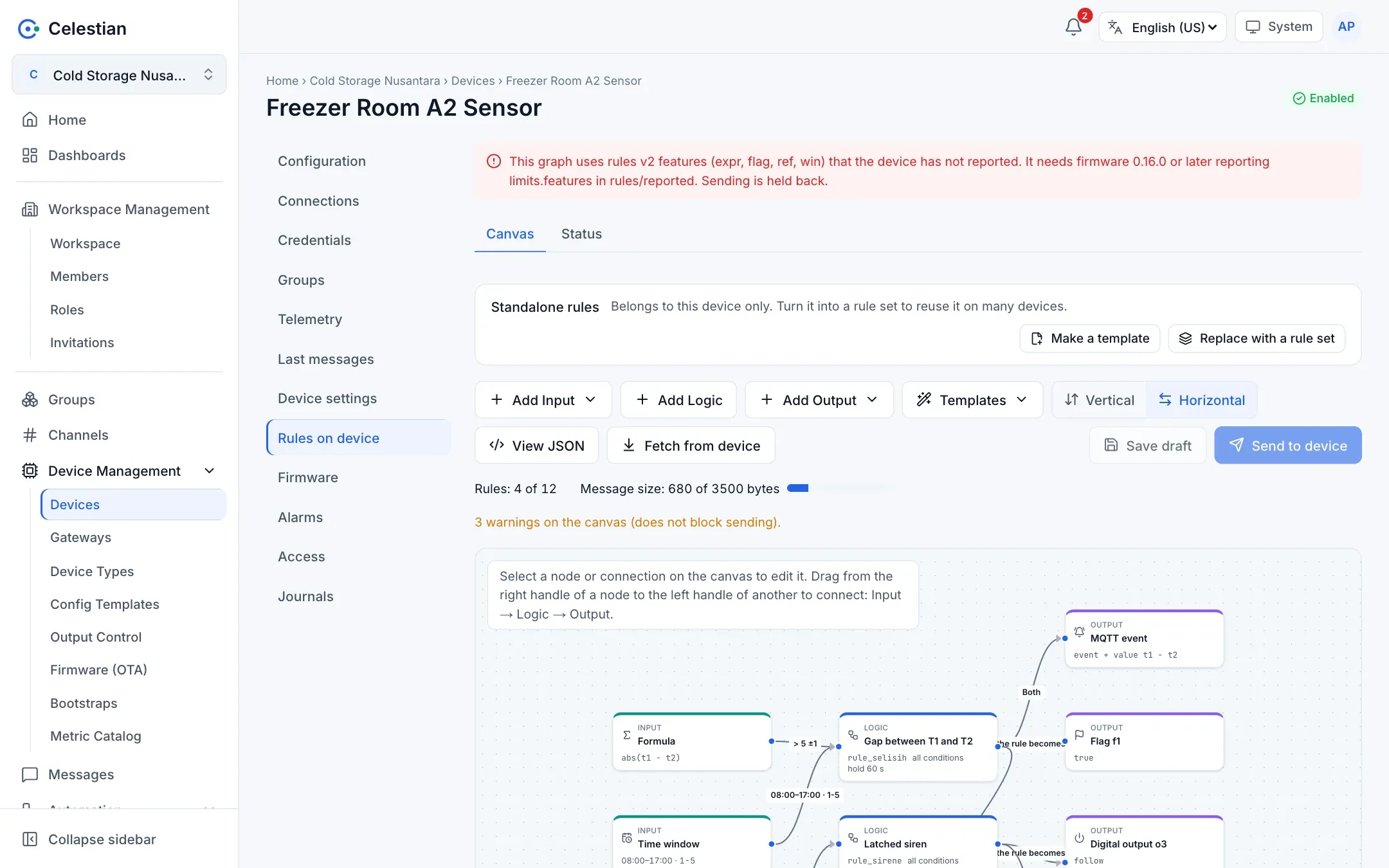
Section titled “Device support”The device reports the features it understands in rules/reported (limits.features: expr, ref, flag, win). The server sends v2 features only to devices that report them:
- When the graph uses a feature that has not been reported, the Rules on device tab shows a banner and the Send to device button is disabled. A device that has never reported is treated as not supporting it.
- Applying a rule set and staged rollouts warn in the preview and do not send to a device that does not support the features.
- Older firmware that receives these features rejects only that rule (
key tidak dikenal); v1 rules keep running. The server holds the send so you do not end up there.
The Rules on device tab
Section titled “The Rules on device tab”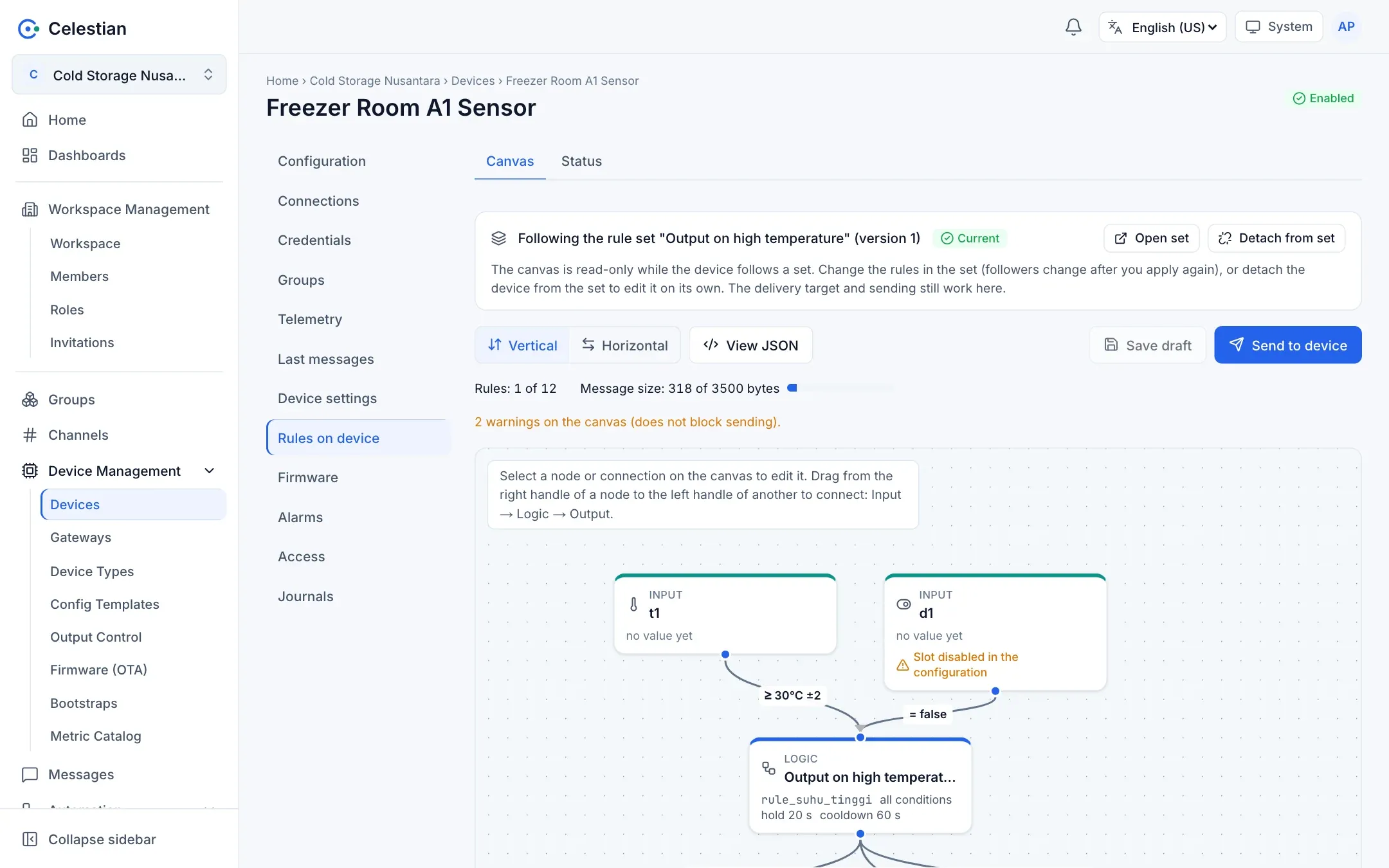
- The Add menu for Input, Logic, Output, and built-in templates (output automation by temperature, a door-open siren, abnormal voltage, a leak alert).
- The latest value of a source, the active status of each rule, and the device’s rejections are shown on the nodes.
- The rule quota and message size are visible, and you can see the compiled JSON.
- Fetch from device asks the device to report the rules in effect (
get_rules), then translates them back into a graph. You can load it onto the canvas as a draft.
The send flow
Section titled “The send flow”- Save the draft.
- Send: the server sends the WHOLE set (
{"rules_ver": N, "rules": [...]}) as a retained message.rules_verincreases automatically. What is stored is the exact bytes sent plus a CRC-32. - The device reports
rules/reported(version and CRC-32). The sync status is compared as for configuration (none,draft,waiting,partial,synced,drift,replaced). - The reconciler resends the same bytes when the device reports an older
rules_ver.
Sending with confirmation (firmware 0.8.1 and later): the set is applied with a time window (30 to 3600 seconds) to be confirmed; without confirmation, the device returns to the previous set. Rollback to the previous set is also available.
Rule sets: templates for many devices
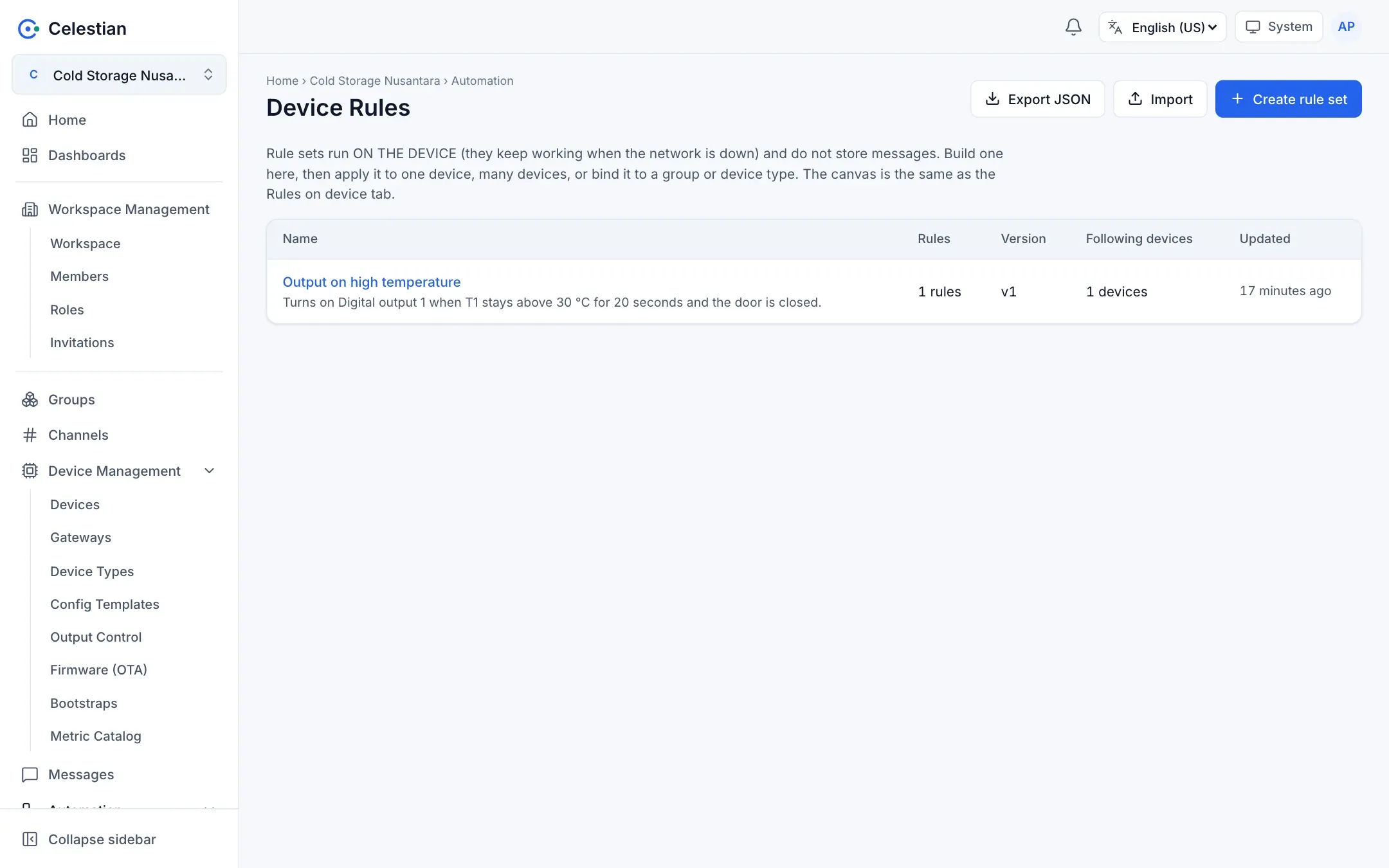
Section titled “Rule sets: templates for many devices”Created at workspace level through the menu Automation → Device Rules. A template-first approach: you create a rule set once, then apply it.
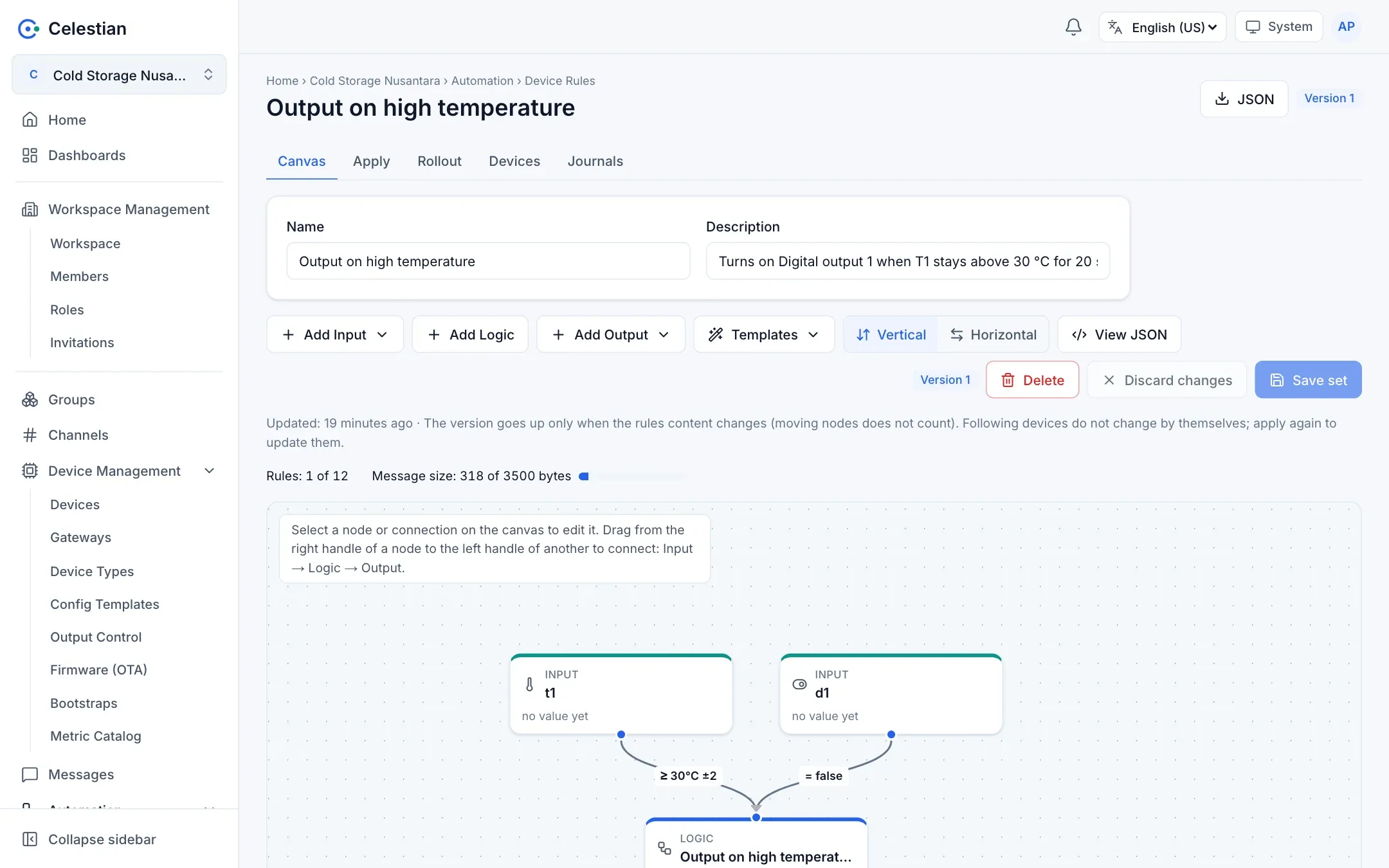
- Apply to 1 to 200 devices with a per-device preview (the
device.configurepermission is checked per device). Skipped when: it is a gateway, has no serial, the model differs, it already has its own rules, or it follows another set.overwriteis off by default. - Bind a set to a device type or group: a new device that does not yet have rules automatically uses it (it never overwrites).
- A device stores a copy of the graph. Changing the set does not change the device; devices that fall behind are marked and can be re-applied. A device can detach (become independent) or update to the latest set version.
- No parameters: different thresholds mean a different set.
- Staged rollout: send a set to many devices in waves (a canary, cumulative percentages, pauses, a timeout, a failure threshold that stops the rollout), with controls to pause, resume, cancel, retry, and skip. A device succeeds when
rules/reportedmatches. - Export and import of rule sets: Configuration files.
The canvas can be set to Vertical or Horizontal.